FixForge › Marine › Marine Electronics › Raymarine Evolution Current Overload
Raymarine Evolution Autopilot: CURRENT OVERLOAD
CURRENT OVERLOAD is the Evolution autopilot's most serious drive error. Raymarine calls it a serious drive failure: the drive is pulling far more current than it should, because something is shorted or something is jammed. CLUTCH OVERLOAD has the same causes plus one extra check. This page covers both, and how to tell them apart from STALL DETECTED and DRIVE STOPPED.
Last Updated: November 2026
Fast Answer
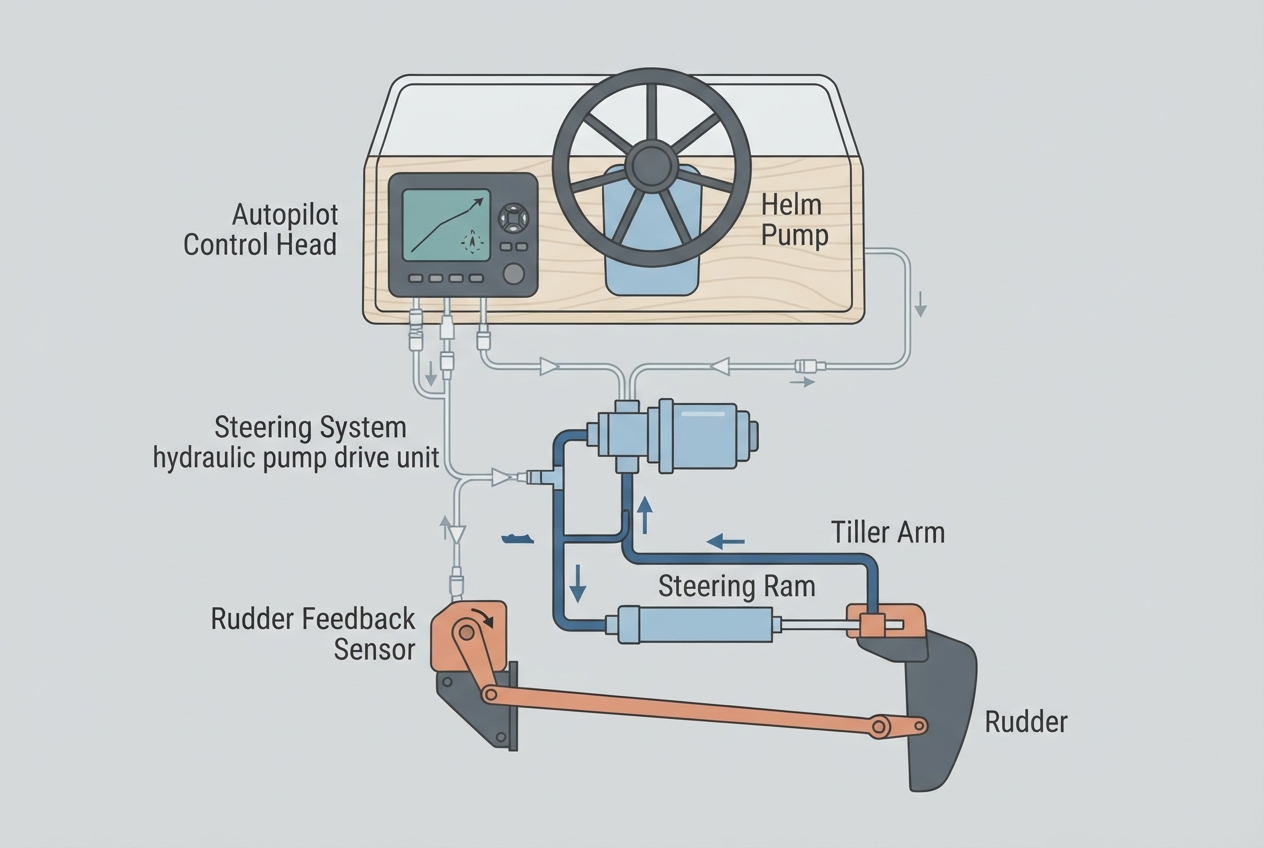
Steer by hand first. Raymarine's causes for CURRENT OVERLOAD are a faulty drive unit or motor, a wiring short-circuit, or a fault in the steering system that is making the drive lock up. Check, in that order of ease: that the steering turns freely by hand, that the drive cables between the ACU and the drive are not shorted or damaged, and then the drive unit itself, which is Raymarine's one instruction. For CLUTCH OVERLOAD, also confirm the drive's clutch does not exceed the clutch power output rating of your Evolution ACU.
A steering fault can make the drive unit lock up and draw too much current.
A short-circuit in the drive wiring is one of Raymarine's listed causes.
A faulty drive unit or motor. Raymarine's fix: check the drive unit.
CLUTCH OVERLOAD: the clutch must not exceed the ACU's clutch power output rating.
What Raymarine Says
The Evolution error tables give these entries:
- CURRENT OVERLOAD: serious drive failure; the drive is demanding too much electrical current due to short-circuit or jamming. Failure caused by a faulty drive unit or motor, or wiring short-circuit. Alternatively, a fault in the steering system may be causing the drive unit to lock-up. Solution: check the drive unit.
- CLUTCH OVERLOAD: the same causes. Solution: refer to the clutch power output ratings provided in the installation instructions for the relevant Evolution-Series components, and ensure that the clutch for the drive unit does not exceed this power output rating.
Two neighbouring errors are easy to confuse with these:
- STALL DETECTED: motor speed dropped too low for the given course change, or the motor is stalling. Raymarine puts this down to a faulty drive unit or steering fault, or a steering hard-over time that is too slow, and says to check the drive unit operates and is not stalled and to check the steering hard-over time.
- DRIVE STOPPED: the motor or steering has not moved within 20 seconds of a course change command. See our Drive Stopped guide.
The difference is current: an overload means the drive is drawing too much, a stall means it is moving too slowly, and drive stopped means nothing moved in time.
Step 1: Steer by Hand and Check the Steering
Put the pilot in standby and steer manually. Then, with the boat secure, turn the helm slowly from lock to lock. Raymarine lists a fault in the steering system that makes the drive lock up as a cause, so any tight spot, binding or end-stop the steering hits early is the first thing to find.
Step 2: Look for a Wiring Short
Switch the vessel's power supply off first. Raymarine's installation instructions warn not to connect or disconnect equipment with the power switched on.
- Check all connections at the ACU and at the drive unit; Raymarine lists both for DRIVE STOPPED, and they are the ends of the same cable.
- Inspect the motor cable along its run for chafe, crushed insulation or strands touching between terminals.
- If the motor and power cables have been disturbed, confirm they are on the right terminals: reversed cables raise a separate MOTOR POWER SWAPPED error.
Step 3: The Clutch (CLUTCH OVERLOAD)
Some drive units have a clutch powered from the ACU. Raymarine's instruction is to look up the clutch power output rating in the installation instructions for your Evolution components and make sure the drive's clutch does not exceed it. The EV-1 manual's DRIVE STOPPED entry also lists checking the ACU's drive and clutch voltage output.
Step 4: The Drive Unit
If the steering is free and the wiring is sound, Raymarine's remaining cause is a faulty drive unit or motor, and its single instruction is to check the drive unit.
Step 5: Rule Out the ACU Recall
Raymarine has recalled some ACU-150 and ACU-400 units built in June and July 2022 because of a drive component of incorrect specification that could fail prematurely. Its bulletin says this could prevent the autopilot from driving in one or both directions, or cause it to turn the tiller or wheel fully in one direction. Check your ACU serial number in our ACU recall guide before paying for drive repairs.
When to Call a Dealer
Raymarine treats this as a serious drive failure. If the steering is free and the wiring is not shorted, have a Raymarine dealer test the drive unit, and an affected ACU replaced under the recall.
Parts reference
| Part | Part number / spec | Notes |
|---|---|---|
| Drive clutch | Must not exceed the ACU clutch power output rating | Rating is in your Evolution component installation instructions. |
| ACU-150 / ACU-400 | E70430 / E70100 | Check against the June–July 2022 recall ranges. |
Sources
Specifications, part numbers and procedures on this page come from the manufacturer documents below. Where a point comes from owner reports instead, the text says so.
- Raymarine Evolution EV-2 Autopilot Installation Instructions, 87181 Rev 5: Error: CURRENT OVERLOAD (same entry in EV-1 manual 87472)
- Raymarine Evolution EV-1 Autopilot Installation Instructions, 87472 Rev 2: Error: CLUTCH OVERLOAD
- Raymarine EV-1 Installation Instructions, 87472: Error: STALL DETECTED
- Raymarine EV-1 Installation Instructions, 87472: Error: DRIVE STOPPED
- Raymarine EV-1 Installation Instructions, 87472: Error: MOTOR POWER SWAPPED
- Raymarine EV-1 Installation Instructions, 87472: Switch off power supply
- Raymarine ACU-150 / ACU-400 Important Safety Warning, Document 84295 (Rev 2), 19 July 2023
For checking the drive cable for shorts with the power off, and the ACU's drive and clutch output.
Check Price on Amazon →As an Amazon Associate, FixForge earns from qualifying purchases.