FixForge › Marine › Marine Electronics › Simrad Autopilot Not Holding Course
Simrad Autopilot Not Holding Course: Alarm Diagnostic
A Simrad autopilot that alarms out or wanders off course almost always has one of three causes: compass calibration is stale or was never done, the rudder feedback sensor is misaligned or failed, or the drive unit (pump or linear drive) isn't applying enough force to maintain course in current conditions. Alarm codes tell you which subsystem to investigate.
Last Updated: June 2026
Fast Answer
Check the autopilot alarm code — the display shows a code and short description when it disengages. Compass-related alarms: redo compass calibration (boat must be underway for the rotating calibration). Rudder feedback alarms ('Rudder not found' or similar): check the feedback unit wiring and NMEA/SimNet connection. Drive unit alarms: check mechanical connection and hydraulic pressure if applicable.
Autopilot shows alarm code on disengage. Compass = calibration issue. Rudder = feedback sensor. Drive = mechanical.
Must be done underway at speed in slow circles. Stale calibration causes steady course error or weaving.
If 'Rudder feedback not found': check cable, SimNet/NMEA 2000 connection, and power to the feedback unit.
AP needs vessel speed to operate in compass mode. If no SOG data: check GPS fix and NMEA output settings.
Reading Autopilot Alarm Codes
The Simrad autopilot controller displays an alarm code and brief description when it disengages unexpectedly. The code tells you which subsystem to investigate:
- Compass alarms (examples: "Compass Error", "Off Course"): the course error exceeded the configured threshold, usually because compass calibration is wrong or the compass is in a location with magnetic interference.
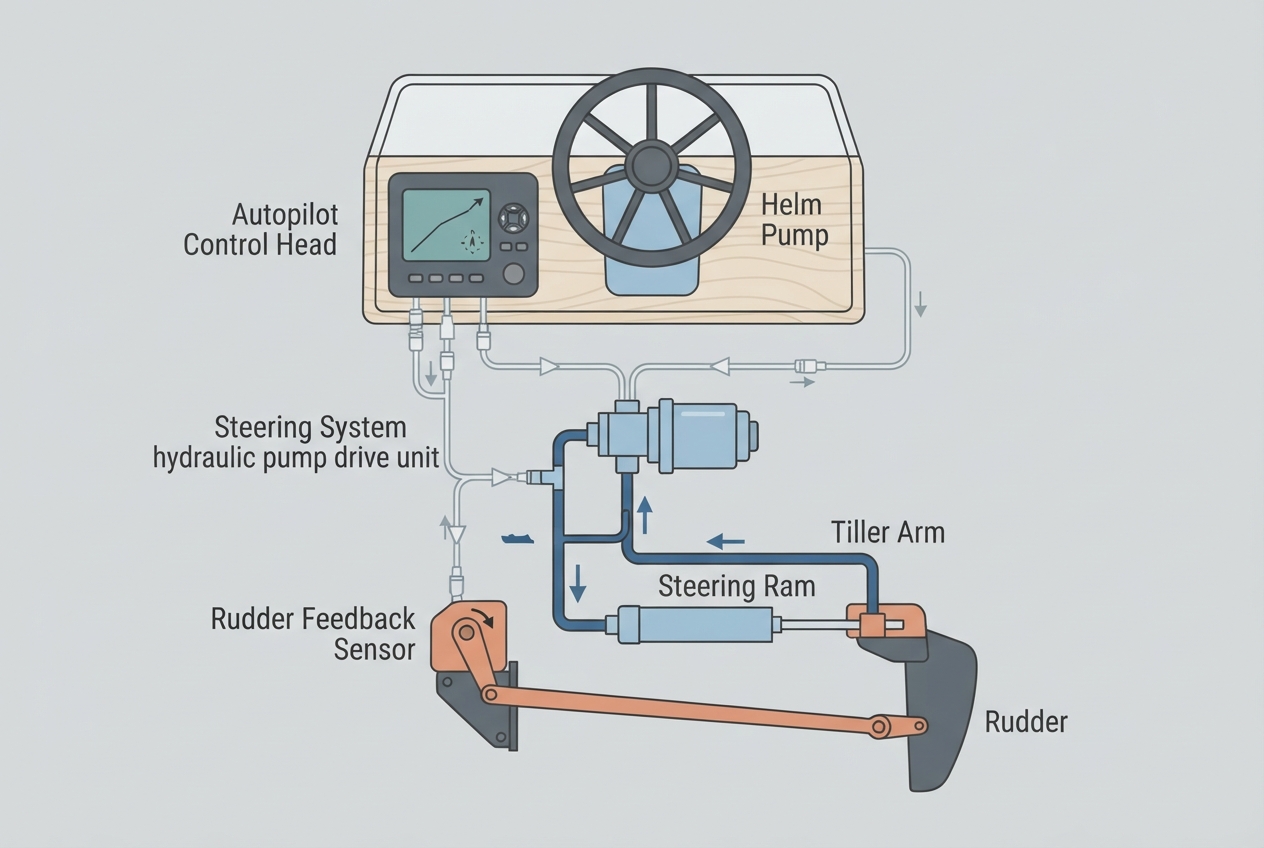
- Rudder feedback alarms (examples: "No Rudder Feedback", "Feedback Error"): the autopilot can't read rudder position. Can't maintain course without knowing where the rudder is.
- Drive unit alarms (examples: "Drive Unit Error", "Overcurrent"): the hydraulic pump or linear drive is stalling or drawing excessive current — usually mechanical binding or a pump that's lost prime.
- Speed alarms (examples: "No Speed Data", "Check Speed Source"): SOG data is not being received, which some AP modes require.
Compass Calibration
The Simrad autopilot's internal compass (usually in the AP24/28 controller or in a separate compass module) must be calibrated with the boat underway. The calibration process involves driving the boat in slow circles to map the compass deviation caused by the boat's own magnetic field (engine, metal components, electrical wiring). Without calibration, the autopilot thinks it's going a different direction than it actually is, causing constant course correction in the wrong direction.
- Navigate to: AP Setup > Compass Calibration (or Autopilot Settings > Initial Setup > Dockside Wizard, which includes compass calibration).
- Initiate the calibration procedure. The unit will ask you to drive the boat in slow circles (typically 2–3 full rotations at 2–3 knots in calm water).
- Allow the procedure to complete — this takes 3–5 minutes. Do not interrupt.
- After calibration, set the autopilot to a known compass heading and verify it matches your external compass or GPS COG within a few degrees.
Rudder Feedback Sensor
The rudder feedback unit (RF25 or similar) mounts on the rudder shaft or steering quadrant and tells the autopilot the exact rudder angle. Without this data, the autopilot can't perform closed-loop course keeping — it's flying blind on rudder position.
- Check the feedback unit cable connections at both ends — the unit end and the autopilot controller end.
- If connected via NMEA 2000 or SimNet: check the T-connector at the bus for corrosion or loose seating.
- Navigate to AP Diagnostics (Settings > Autopilot > Diagnostics or similar) and check if rudder feedback is listed as a detected device.
- Manually move the rudder and watch the rudder angle indicator on the AP display — it should move correspondingly. If it doesn't move at all, the feedback unit is not communicating.
- Check 12V power to the feedback unit — a multimeter at the power pins on the feedback unit connector should show 12V with the AP on.
Sea Conditions and AP Gain Settings
An autopilot that holds course in calm water but wanders in chop is not necessarily faulty — it may need gain adjustment. The AP response settings (Sea State, Response) control how aggressively the autopilot corrects course deviations. In choppy conditions, a high response setting causes constant over-correction (hunting); a lower setting ignores small deviations and lets the boat hunt slightly. Finding the right setting for conditions is part of using an AP effectively.
Navigate to AP Settings and adjust the Sea State or Response setting to match current conditions. In following seas especially, many AP systems struggle — this is a known limitation, not a fault.
Parts reference
| Part | Typical cost | Notes |
|---|---|---|
| Simrad RF25 rudder feedback unit | $120–180 | Standard Simrad feedback unit. Mounts on rudder shaft or quadrant. |
| SimNet/NMEA 2000 T-connector | $18–30 | Corrosion in T-connectors causes intermittent feedback signal loss. |
| SimNet cable (per meter) | $15–25 | For replacing corroded or damaged feedback unit cable runs. |
Mounts on rudder shaft. Required for closed-loop autopilot course keeping.
Check Price on Amazon →As an Amazon Associate, FixForge earns from qualifying purchases.
Replacement T-connector for SimNet/NMEA 2000 network. Corrosion in connectors causes feedback signal loss.
Check Price on Amazon →As an Amazon Associate, FixForge earns from qualifying purchases.