FixForge › Marine › Marine Electronics › Raymarine Evolution Autopilot Drive Stopped
Raymarine Evolution Autopilot: DRIVE STOPPED
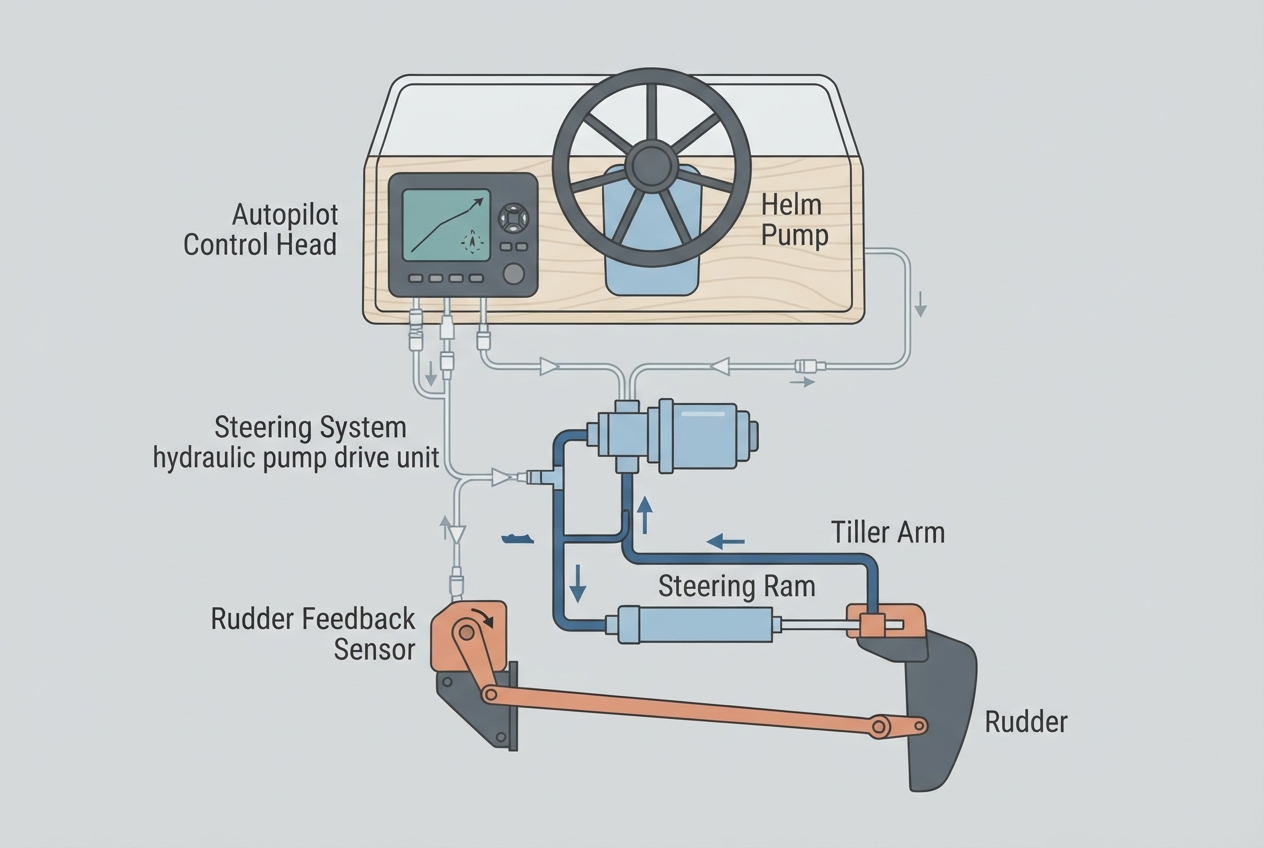
DRIVE STOPPED is the Evolution autopilot telling you it asked the drive to move the rudder and the rudder did not respond. The cause can be anywhere between the ACU and the rudder: a rudder reference that is set up wrong, a loose drive cable, a drive unit that has stalled, a steering system that is binding, or the pilot resetting itself. Raymarine's troubleshooting table gives the checks in a clear order.
Last Updated: November 2026
Fast Answer
Raymarine raises DRIVE STOPPED when the motor or steering has not moved within 20 seconds of a course change command. Take the helm, then work through Raymarine's list: make sure the rudder angle reference sensor is installed to match the rudder's limits and end-stops, check every connection at the ACU and at the drive unit, measure the ACU's drive and clutch output voltage, and confirm the drive unit runs and the steering system is secure. If the error comes with the pilot restarting, look at the power wiring and the sleep switch, and bring the EV sensor and ACU software up to date.
The rudder did not move within 20 seconds of a course change command.
The rudder angle sensor may have passed the preset rudder limits or end-stops.
Check all connections to the ACU and the drive unit, then the drive and clutch output voltage.
A sleep switch, faulty wiring that power-cycles the pilot, or a software error can also raise it.
What Raymarine Says Causes It
The Evolution error table (the same entry appears in the EV-1 and EV-2 installation instructions) lists these possible causes for DRIVE STOPPED:
- Motor / steering has not moved within 20 seconds of a course change command.
- The autopilot is unable to turn the rudder, either because the weather load on the helm is too high, or because the rudder angle sensor has passed beyond the preset rudder limits or rudder end-stops.
- The autopilot resets due to an external event, such as use of the sleep switch, or faulty wiring causing the autopilot components to power cycle.
- The autopilot resets due to a software error.
Evolution components send alarms over SeaTalk NG to the pilot controller and MFDs with an audible alert. Raymarine says the alarm stops when the condition ceases or you acknowledge it, and a safety-critical alarm is raised again after a timed delay. Acknowledging it does not fix anything, so keep a hand on the helm while you diagnose.
Step 1: Note When It Happens
- Only near full rudder: points at the rudder reference and limits (Step 2).
- In heavy weather with a lot of helm load: Raymarine lists weather load on the helm as a cause in its own right.
- With the pilot restarting or the display showing the pilot starting up: points at power wiring, the sleep switch or software (Step 6).
- Every time you engage, from the dock: points at the drive, its wiring or the steering (Steps 3 to 5).
Step 2: Rudder Reference and Limits
Raymarine's first check is that the rudder angle reference sensor has been installed correctly to reflect the limits and end-stops of the vessel's rudder system. If the sensor reads past the preset limits, the pilot stops driving. If your system has a rudder reference and you also see NO RUDDER REFERENCE, deal with that first: see our No Rudder Reference guide.
Step 3: Connections at the ACU and the Drive
Switch the vessel's power supply off before you start. Raymarine's installation instructions warn not to connect or disconnect equipment with the power switched on.
- Check all connections to the ACU.
- Check all connections to the drive unit.
- Look for loose, corroded or damaged terminals and cables between the two.
Step 4: Drive and Clutch Output
The EV-1 manual adds a check the EV-2 manual does not: check the ACU drive output voltage, and the drive and clutch voltage output if applicable. A multimeter at the ACU's motor and clutch terminals while the pilot commands a turn tells you whether the ACU is sending power. If it is, the fault is downstream, in the cable or the drive. If it is not, the fault is at the ACU or in the commands reaching it.
Two related errors narrow it down. STALL DETECTED means motor speed dropped too low for the course change, or the motor is stalling, which Raymarine puts down to a faulty drive unit, a steering fault, or a steering hard-over time that is too slow. CURRENT OVERLOAD means the drive is demanding too much current; see our Current Overload guide.
Step 5: Drive Unit and Steering
- Check that the drive unit operates and has not stalled.
- Check that the steering system is secure.
- Check the steering hard-over time, which Raymarine lists for STALL DETECTED.
- Volvo Penta EVC systems (EV-2): make sure more than one second has elapsed after turning the vessel's steering wheel before you select Auto.
Step 6: Resets, Software and the ACU Recall
- Resets: if the pilot is power cycling, check the power wiring and whether a sleep switch is being used.
- Mercury gateway: ACU software v1.13 (December 2015) corrected a SeaTalk NG communications issue when a Mercury Gateway is connected on the same bus for engine data. This could cause the Evolution pilot to report Drive Stopped or No Pilot.
- Update order: Raymarine warns you must update the EV sensor before updating your ACU.
- ACU-150 / ACU-400 recall: some units built in June and July 2022 have a drive component that could fail and prevent the autopilot from driving in one or both directions. Check your serial number in our ACU recall guide.
When to Call a Dealer
If the drive does not run with good voltage at its cable, or the ACU sends no output with every connection good, the drive or the ACU needs a Raymarine dealer. Any ACU-150 or ACU-400 in the recall range goes to a dealer regardless.
Parts reference
| Part | Part number / spec | Notes |
|---|---|---|
| Trigger | No rudder movement within 20 seconds | Of a course change command. |
| ACU software | v1.13 or later | Fixes Drive Stopped / No Pilot with a Mercury Gateway on SeaTalk NG. |
| ACU-150 / ACU-400 | E70430 / E70100 | Check against the June–July 2022 recall serial ranges. |
Sources
Specifications, part numbers and procedures on this page come from the manufacturer documents below. Where a point comes from owner reports instead, the text says so.
- Raymarine Evolution EV-1 Autopilot Installation Instructions, 87472 Rev 2: Error: DRIVE STOPPED
- Raymarine Evolution EV-2 Autopilot Installation Instructions, 87181 Rev 5: Error: DRIVE STOPPED
- Raymarine EV-1 Installation Instructions, 87472: Error: STALL DETECTED
- Raymarine EV-2 Installation Instructions, 87181: Alarms
- Raymarine EV-1 Installation Instructions, 87472: Switch off power supply
- Raymarine, Evolution Autopilot ACU Software (software history)
- Raymarine, ACU-150 & ACU-400 Product Recall
Raymarine's EV-1 checks include the ACU drive output voltage and clutch voltage output. A basic DC multimeter does it.
Check Price on Amazon →As an Amazon Associate, FixForge earns from qualifying purchases.